
1. Connect the number on Datacrazy
Go to Connections → Create new.
Select Cloud API with login via Facebook.
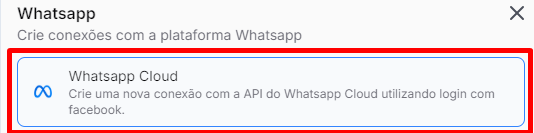
Fill in the requested fields:
Connection name
PIN (2FA, if set previously)
Business portfolio
Address information (optional)
⚠ Attention:
During this process, it is required to create a new WABA (WhatsApp Business Account) using the same phone number that was on the previous platform.
When prompted by Meta, add a payment method to the new WABA.
2. Finish the migration in Datacrazy
After adding the payment method, go back to Datacrazy on the connection screen that stayed open.
Click on Finish.
✅ With the new WABA created and the payment method set up, the migration will finish properly with no linking errors.
3. Testing and checks
Make sure the correct connection is selected in Datacrazy.
In Multiatendimento, keep it without filters:
Show all departments
Show all connections
No active tag filter
Run tests for:
Sending messages
Receiving messages
❗ Important note about sending messages
You'll only be able to send messages without a template if the contact already has the 24h service window open.
If the window isn't open:
Register and send a message template to run the test, or
Send an external message to this number to open the 24-hour window and allow interaction.
✅ Conclusion
The migration was completed successfully and the connection is active on Datacrazy.