App Creation, Token Generation And Dataset (whats App + Marketing Api)
We’re not creating the App for direct functional use, but rather to:
🔐 Generate a reliable system token
🔗 Integrate this token with CRM Datacrazy
📊 Track leads coming from ads (Tracking #1)
🛒 Send purchase events to the WhatsApp Pixel (Tracking #2)
This token is the foundation of the entire tracking integration with Meta.
NOTE: For better sampling of metrics, and in a more accurate way, you need to create a messages campaign with PURCHASE OBJECTIVE.
Message campaigns with the objective of maximizing the number of conversations will not show PURCHASE conversion according to META support.
While creating the App, select the following main use cases:
Create and manage ads with the Marketing API
Connect with customers via WhatsApp
Manage everything through your Facebook Page
After creating the App, also add:
read_insights
Path: Manage Pages → click on ADD
whatsapp_business_manage_events
Path: Connect on WhatsApp → click on ADD
⚠ These use cases are necessary to release permissions that will be used in the token.
In the App settings menu, enter:
Privacy Policy URL
https://datacrazy.io/politica
Terms of Service URL
https://datacrazy.io/termos
User Data Deletion URL
https://datacrazy.io/politica
After filling it out:
➡ Click on Save
➡ Then on Publish
➡ App Status: OK / Active
Go to System Users
Create a user with:
Type: ADMIN
Name: Tracking
Select the user you created
Click the three dots (…)
Choose Assign assets
Select APP
Assign the App created earlier with:
✅ Permission: Full control
With the Tracking user selected
Click on Generate Token
Select the created App
Set the expiration: NEVER
Check the following permissions:
ads_read
whatsapp_business_management
whatsapp_business_messaging
whatsapp_business_manage_events (requires active use case)
read_insights (requires active use case)
➡ Generate and save the token safely.
⚠ Important notice: The token is only displayed once at the time of generation. If you close the window/modal without saving, it cannot be viewed again.
If this happens, you'll need to generate a new token (it doesn't cause technical issues, just rework). So, save the token immediately in a safe place.
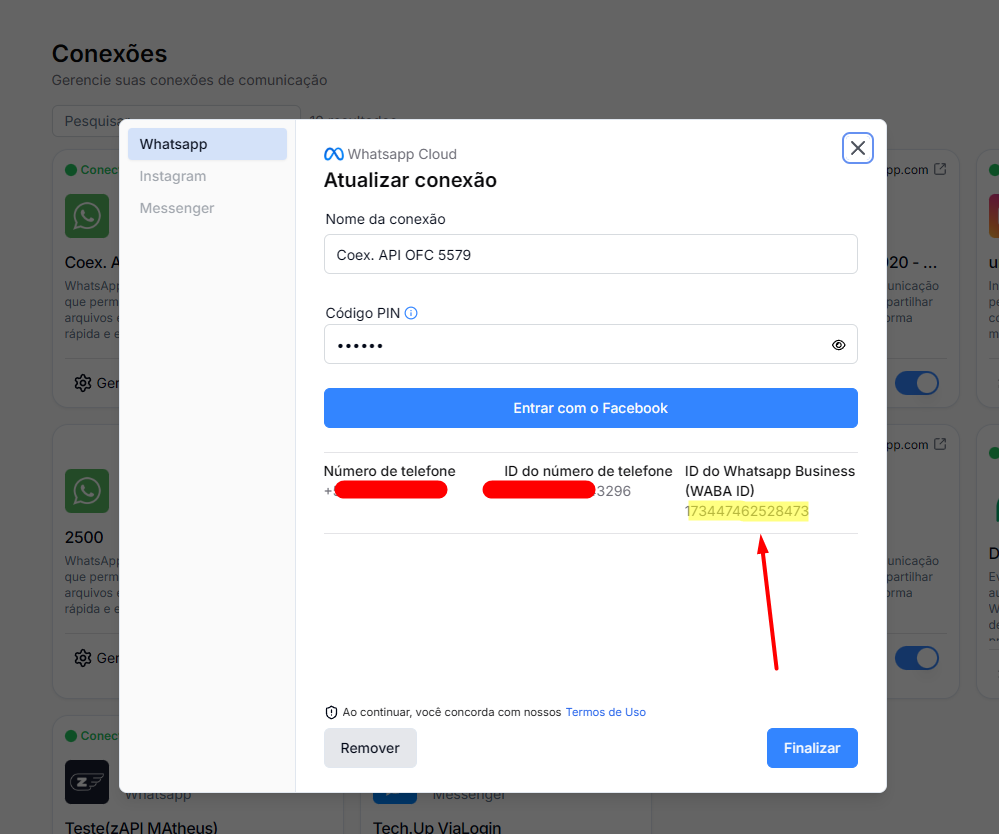
The WABA ID is the ID of your WhatsApp Business account and will be used in API calls.
Go to Connections in the Datacrazy CRM
Click on your WhatsApp connection
Go to Manage / Update connection
Find the field WhatsApp Business ID (WABA ID)
📷 Image #1 – WABA ID location
The image below highlights exactly where the WABA ID can be found on the connection configuration screen.
This is the value that must be used in the API calls in the next steps.
Image #1
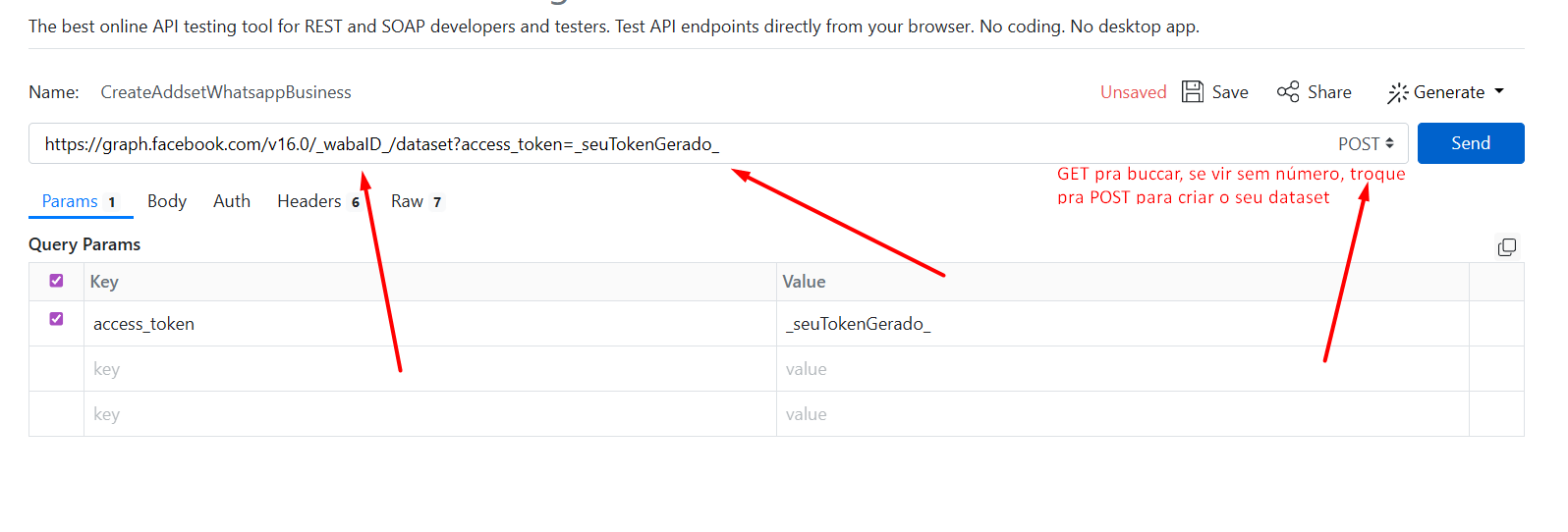
For this step, we’ll use ReqBin to test the API:
https://graph.facebook.com/v16.0/_WABA_ID_/dataset?access_token=_SEU_TOKEN_
🔁 Replace:
_WABA_ID_ with the WABA ID of your account
_SEU_TOKEN_ with the token generated in the previous step
Method: GET
URL: endpoint above
✅ If it returns data → dataset already exists
⚠ If it returns empty → you'll need to create it
If the GET doesn't return any dataset:
Method: POST
URL: same endpoint
Headers:
Content-Type: application/json
The body of the request may vary depending on the API. If it’s required, follow the pattern shown in the video/tutorial.
Status 200 or 201 → Dataset created successfully
Image #2
After completing all the steps:
✅ App created and published
✅ System user configured
✅ Token generated with correct permissions
✅ Dataset created or validated
Always follow the order of the steps
Permissions only appear on the token if the use case is active
Use the support video to validate specific payload details
🎥 Follow the steps in the video as indicated.
📌 Flows used:
Responsible for receiving leads and saving the information of the ad that originated the click.
This flow uses the token generated by the App to:
Identify the lead source (campaign, ad set, ad)
Associate the lead with the correct ad
Persist this data in the Datacrazy CRM
Responsible for sending purchase (won) events to the WhatsApp Business Pixel.
This flow allows you to:
Report conversions to Meta
Improve ad optimization and learning
Close the tracking loop between ad → lead → purchase
https://drive.google.com/file/d/1WMvmW2ELcJHM0Y9-Wdp177ERqEOf13nh/view?usp=drive_link
Explanation for those who use flow #3 when CTWA_ID/FBCLID is missing
https://drive.google.com/file/d/1hx3CAVhoVdSYA2TmGVAxS6xHwncLJsLE/view?usp=drive_link
Used when there is NOT:
ctwa_id
fbclid / fbc
Tracking done via:
Phone (SHA256)
CAPI / Offline Events
Meta Pixel
Meta tries to:
Identify the user via data (e.g. phone)
Match with ad clicks
👉 Without a strong identifier, the match is weak
Situation
Result
Only phone (hash) | Weak match |
No identifier | No attribution |
Multiple clicks | Loses trust |
Different phones | Match failure |
❌ Doesn’t show up in campaigns (in most cases)
⚠ Weak optimization
⚠ Low-quality signal
✅ Still feeds the algorithm (a little)
Only attribute if there is:
Strong user match
clear and unique click
Type
Quality
Pixel + fbclid / CTWA_ID | High |
CAPI with fbc/fbp | Medium-high |
Flow #3 (SHA256) | Low |
Keep sending it (better than nothing)
Classify as LOW_QUALITY
Don’t use as the main metric
Prioritize capturing:
ctwa_id
fbclid
ref
Feeds Meta → YES
Optimizes campaigns → A little
Generates attribution → Rarely
Complementary, doesn’t replace proper tracking.