---
title: "Ad tracking and sending purchase event to Facebook"
description: "Step-by-step guide to create an App in Meta, set up use cases, generate system token, required permissions, and create/query dataset via API using WABA ID."
url: https://help.datacrazy.io/en/articles/10670775-ad-tracking-and-sending-purchase-event-to-facebook
collection: "Automations"
updated: 2026-11-18
language: en
alternates: [pt-br, es]
---
# Ad tracking and sending purchase event to Facebook
Step-by-step guide to create an App in Meta, set up use cases, generate system token, required permissions, and create/query dataset via API using WABA ID.
App Creation, Token Generation And Dataset (whats App + Marketing Api)
* * *
## The goal of this guide is to complement the video below
We’re not creating the App for direct functional use, but rather to:
- 🔐 Generate a **reliable system token**
- 🔗 Integrate this token with **CRM Datacrazy**
- 📊 Track leads coming from ads (**Tracking #1**)
- 🛒 Send purchase events to the WhatsApp Pixel (**Tracking #2**)
This token is the foundation of the entire tracking integration with Meta.
NOTE: For better sampling of metrics, and in a more accurate way, you need to create a messages campaign with PURCHASE OBJECTIVE.
Message campaigns with the objective of maximizing the number of conversations will not show PURCHASE conversion according to META support.
* * *
## Step 1 – Create the APP
### Use cases when creating the App
While creating the App, select the following **main use cases**:
- Create and manage ads with the **Marketing API**
- Connect with customers via **WhatsApp**
- Manage everything through your **Facebook Page**
### Additional use cases (required)
After creating the App, also add:
- **read\_insights**
Path: _Manage Pages_ → click on **ADD**
- **whatsapp\_business\_manage\_events**
Path: _Connect on WhatsApp_ → click on **ADD**
> ⚠ These use cases are necessary to release permissions that will be used in the token.
* * *
## Step 2 – Set up the App’s required links
In the App settings menu, enter:
- **Privacy Policy URL**
[https://datacrazy.io/politica](https://datacrazy.io/politica)
- **Terms of Service URL**
[https://datacrazy.io/termos](https://datacrazy.io/termos)
- **User Data Deletion URL**
[https://datacrazy.io/politica](https://datacrazy.io/politica)
After filling it out:
➡ Click on **Save**
➡ Then on **Publish**
➡ App Status: **OK / Active**
* * *
## Step 3 – Create System User
1. Go to **System Users**
2. Create a user with:
- **Type:** ADMIN
- **Name:** Tracking
### Assign the App to the user
1. Select the user you created
2. Click the **three dots (…)**
3. Choose **Assign assets**
4. Select **APP**
5. Assign the App created earlier with:
- ✅ **Permission: Full control**
* * *
## Step 4 – Generate System Token
1. With the **Tracking** user selected
2. Click on **Generate Token**
3. Select the created **App**
4. Set the **expiration:** NEVER
### Required permissions on the token
Check the following permissions:
- `ads_read`
- `whatsapp_business_management`
- `whatsapp_business_messaging`
- `whatsapp_business_manage_events` _(requires active use case)_
- `read_insights` _(requires active use case)_
➡ Generate and save the token safely.
⚠ **Important notice:** The token **is only displayed once** at the time of generation. If you **close the window/modal without saving**, it **cannot be viewed again**.
If this happens, you'll need to **generate a new token** (it doesn't cause technical issues, just rework). So, **save the token immediately in a safe place**.
* * *
## Step 5 – Identify the WABA ID
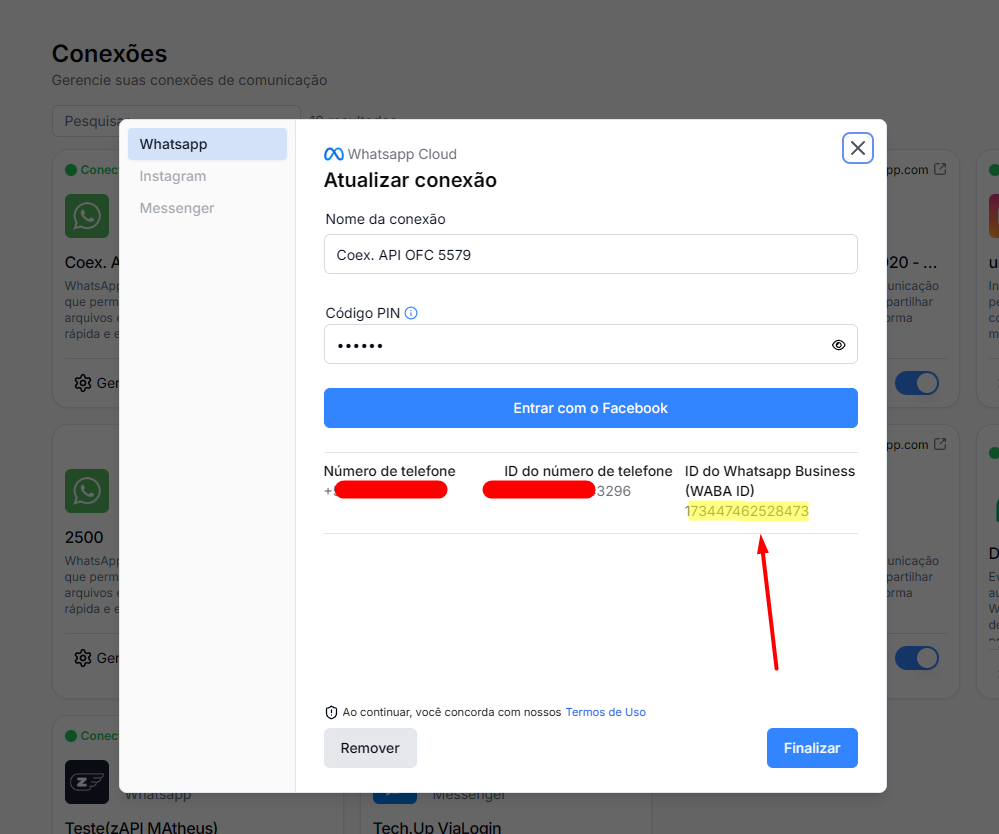
The **WABA ID** is the ID of your WhatsApp Business account and will be used in API calls.
### How to find the WABA ID
1. Go to **Connections** in the Datacrazy CRM
2. Click on your **WhatsApp** connection
3. Go to **Manage / Update connection**
4. Find the field **WhatsApp Business ID (WABA ID)**
📷 **Image #1 – WABA ID location**
The image below highlights exactly where the **WABA ID** can be found on the connection configuration screen.
> This is the value that must be used in the API calls in the next steps.
>
> **Image #1**
>
> 
* * *
## Step 6 – Query or create Dataset via API
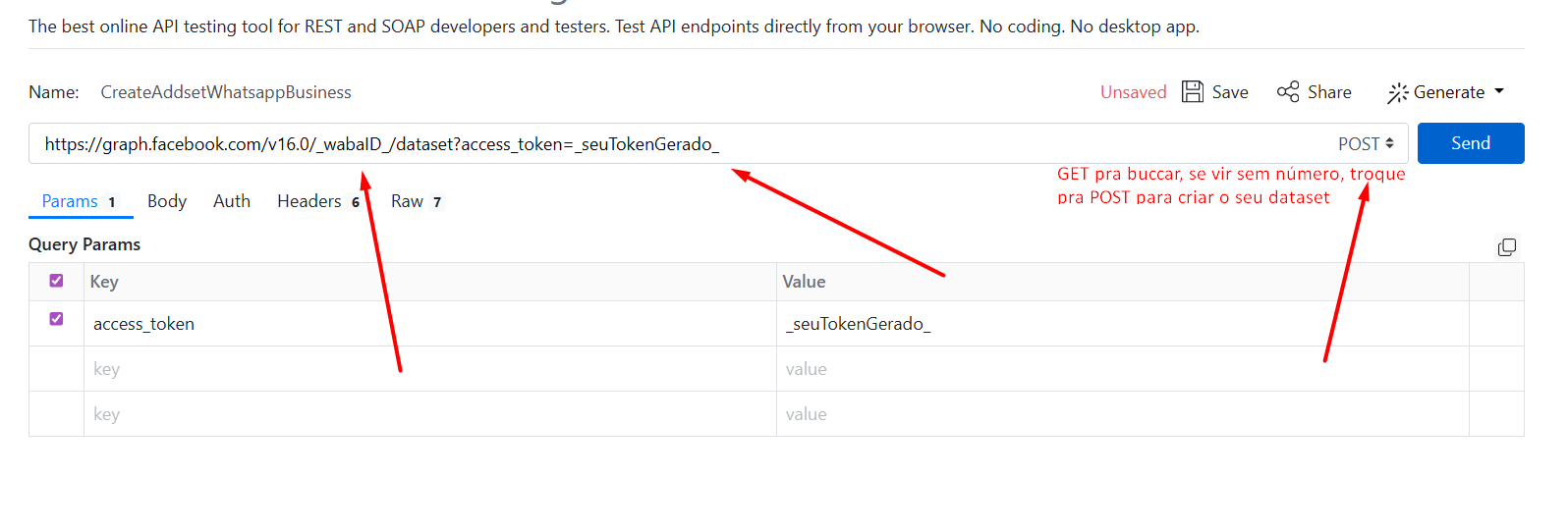
For this step, we’ll use **ReqBin** to test the API:
🌐 [https://reqbin.com/](https://reqbin.com/)
### Endpoint
[https://graph.facebook.com/v16.0/\_WABA\_ID\_/dataset?access\_token=\_SEU\_TOKEN\_](https://graph.facebook.com/v16.0/_WABA_ID_/dataset?access_token=_SEU_TOKEN_)
🔁 Replace:
- `_WABA_ID_` with the WABA ID of your account
- `_SEU_TOKEN_` with the token generated in the previous step
* * *
### Step 6.1 – Query Dataset (GET)
- **Method:** GET
- **URL:** endpoint above
#### Expected result
- ✅ If it **returns data** → dataset already exists
- ⚠ If it **returns empty** → you'll need to create it
* * *
### Step 6.2 – Create Dataset (POST)
If the GET doesn't return any dataset:
- **Method:** POST
- **URL:** same endpoint
- **Headers:**
Content-Type: application/json
> The body of the request may vary depending on the API. If it’s required, follow the pattern shown in the video/tutorial.
#### Expected result
- **Status 200 or 201** → Dataset created successfully
**Image #2**
* * *
## Step 7 – Finishing up
After completing all the steps:
✅ App created and published
✅ System user configured
✅ Token generated with correct permissions
✅ Dataset created or validated
* * *
## Final notes
- Always follow the order of the steps
- Permissions only appear on the token if the **use case is active**
- Use the support video to validate specific payload details
🎥 **Follow the steps in the video** as indicated.
📌 **Flows used:**
### Tracking #1 – Lead Tracking
Responsible for **receiving leads** and **saving the information of the ad** that originated the click.
This flow uses the token generated by the App to:
- Identify the lead source (campaign, ad set, ad)
- Associate the lead with the correct ad
Persist this data in the Datacrazy CRM
##
🔗 Flow Link #1:
[https://drive.google.com/file/d/1-ZomxV6V44HQly1Rmk4CHM1\_aoVGoOSl/view?usp=drive\_link,](https://drive.google.com/file/d/1kaDplV_DEpW11OirAmihOGdthiBKHWZh/view?usp=drive_link)
* * *
### Tracking #2 – Purchase Event Sending (WhatsApp Pixel)
Responsible for **sending purchase (won) events** to the **WhatsApp Business Pixel**.
This flow allows you to:
- Report conversions to Meta
- Improve ad optimization and learning
- Close the tracking loop between ad → lead → purchase
##
🔗 Flow Link #2:
[https://drive.google.com/file/d/1WMvmW2ELcJHM0Y9-Wdp177ERqEOf13nh/view?usp=drive\_link](https://drive.google.com/file/d/1WMvmW2ELcJHM0Y9-Wdp177ERqEOf13nh/view?usp=drive_link)
## Tracking #3 -- (SHA256) sends events without identifiers, feeds Meta with low impact and rarely generates attribution.
Explanation for those who use flow #3 when CTWA\_ID/FBCLID is missing
## 🔗 Flow #3 link
[https://drive.google.com/file/d/1hx3CAVhoVdSYA2TmGVAxS6xHwncLJsLE/view?usp=drive\_link](https://drive.google.com/file/d/1hx3CAVhoVdSYA2TmGVAxS6xHwncLJsLE/view?usp=drive_link)
* * *
## 📌 What it is
Used when there is NOT:
- `ctwa_id`
- `fbclid` / `fbc`
Tracking done via:
- Phone (SHA256)
- CAPI / Offline Events
- Meta Pixel
* * *
## ⚙ How it works
Meta tries to:
1. Identify the user via data (e.g. phone)
2. Match with ad clicks
👉 Without a strong identifier, the match is weak
* * *
## ⚠ Limitations
Situation
Result
Only phone (hash) | Weak match |
No identifier | No attribution |
Multiple clicks | Loses trust |
Different phones | Match failure |
* * *
## 📉 Real impact
- ❌ Doesn’t show up in campaigns (in most cases)
- ⚠ Weak optimization
- ⚠ Low-quality signal
- ✅ Still feeds the algorithm (a little)
* * *
## 🧠 Rule of thumb
Only attribute if there is:
- Strong user match
- clear and unique click
* * *
## 📊 Quality
Type
Quality
Pixel + fbclid / CTWA_ID | High |
CAPI with fbc/fbp | Medium-high |
Flow #3 (SHA256) | Low |
* * *
## 🚀 Recommendation
- Keep sending it (better than nothing)
- Classify as `LOW_QUALITY`
- Don’t use as the main metric
- Prioritize capturing:
- `ctwa_id`
- `fbclid`
- `ref`
* * *
## ✅ Conclusion
- Feeds Meta → **YES**
- Optimizes campaigns → **A little**
- Generates attribution → **Rarely**
> Complementary, doesn’t replace proper tracking.