Coexistence Connection is a BETA product from META (Previously, only Facebook)
Responsibility: Unfortunately this is out of our control, it’s up to META alone to solve this issue. Since it’s META who doesn’t send us the data that arrives in the WhatsApp app, so it shows up the same in the CRM.
Situation:
The first message sent by the lead (coming from an ad to WhatsApp) arrives normally on the phone, but doesn’t arrive in the CRM when the connection is in coexistence mode. It’s an intermittent problem, some come through, others don’t. Consequently we don’t have the ad data to be saved.
Consequence:
The CRM doesn’t receive the webhook
Datacrazy doesn’t receive the event from Meta
The automatic flow doesn’t start
The lead sends a message, but no automation is triggered
Important:
We can partially work around this by making the flow start in another way. But: There’s no way to recover the information to track the ads. This first message never reached datacrazy. There’s nothing that can be done about that!
Meta should send a webhook with the same message that was sent to your phone.
But in some cases, this webhook just isn’t triggered.
Result:
The message exists on WhatsApp
But there’s no event for the CRM to start the flow
We’re going to create an alternative mechanism to start the flow automatically.
 Set up greeting and away messages on your phone
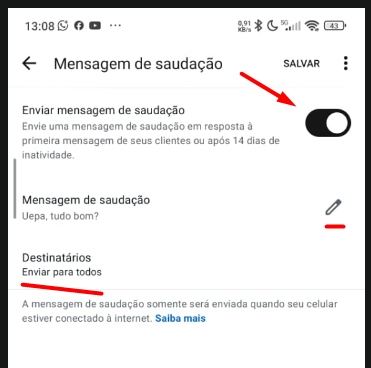
In the WhatsApp Business app (phone): (see image #1 and #2 below.
Go to the chat list
Click on Business tools (bottom right corner)
Go to Greeting message
Set up the text according to your niche
Also turn on Away message
Set it to send even after 12:00 AM (late night)
This makes sure every lead gets an automatic reply.
Image #1
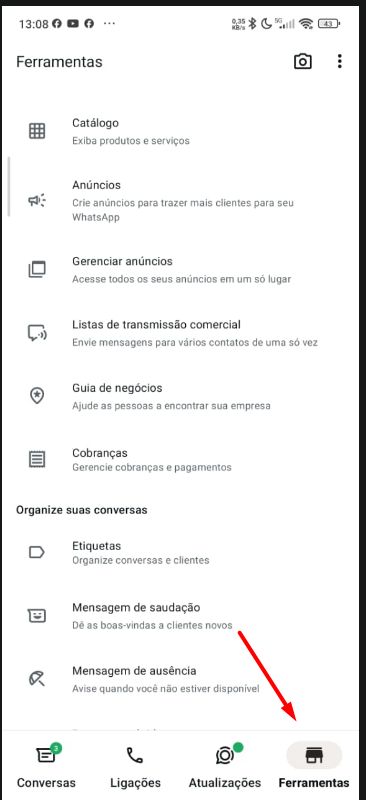
Image #2
 Adjust the flow in the CRM
Now we need to use this automatic message as a trigger. See image #3 and #4 below.
In the incoming message flow:
Go to the first block (start of the flow – left side)
Click on Add trigger
Select:
TYPE MESSAGES → SENT
Image #3 - Normal trigger, message received (It’s likely already like this)
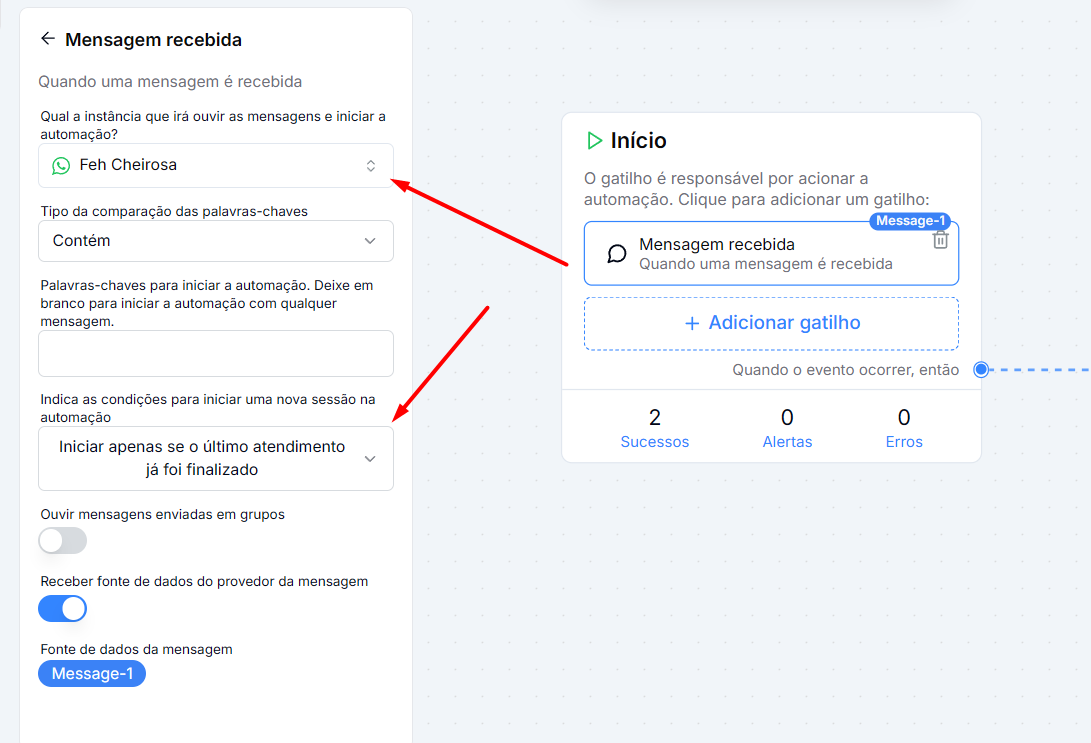
Image #4 - Message Sent Trigger
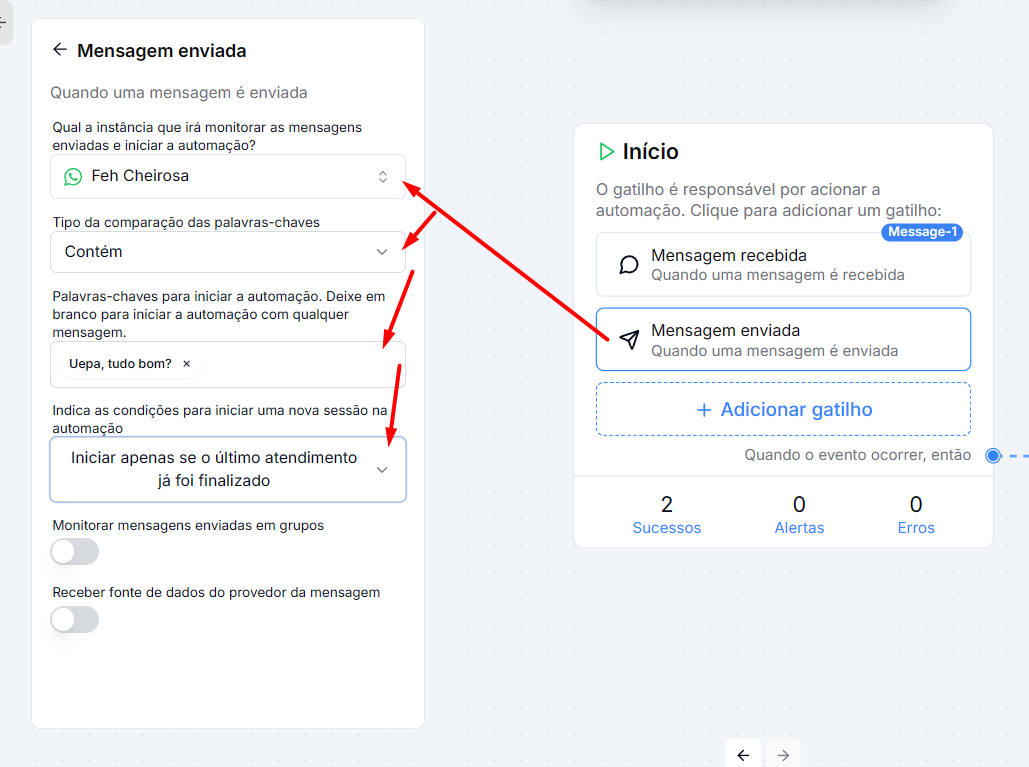
 Copy exactly the text sent from your phone
Copy exactly the text that WhatsApp Business sends as:
Greeting message
Or away message
Paste this text into the trigger set up in the CRM.
 The text needs to be identical. Any difference will stop the trigger from firing.
Tip: When you’re setting up the text, before saving it, copy it. Then paste it into some contact, send it to the CRM to copy from there or type it exactly the same.
Even if Meta doesn’t send the webhook of the lead’s first message:
The phone replies automatically
The CRM identifies the message that was sent
The trigger is activated
The flow starts normally
The issue is a Meta failure in sending the first webhook in coexistence mode.
Until there's an official fix, the practical solution is:
Use an automatic message on the phone
Create a trigger based on the message that was sent
This way we make sure the flow starts automatically even without the first Meta event.
Create a video showing that on the phone your lead comes in normally.
Create another video or in the same one, showing that this same lead doesn’t appear in the CRM.
Show that it will only appear if your phone sends a message to the lead, only after that we’ll receive the webhook.
Open a ticket here at datacrazy, send in text a brief explanation about the Coexistence Bug, ask to transfer it to Tiger Allan, and we’ll open a ticket at META through the Datacrazy CRM.
We’ll send the videos as proof, as well as information about the number connected with the problem in question.
META already has this connection information, we just need to say exactly which one is showing this behavior so they can analyze it.
