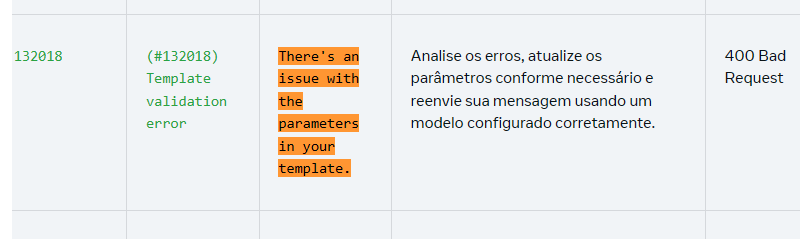
META error documentation link https://developers.facebook.com/documentation/business-messaging/whatsapp/support/error-codes
Missing or too many parameters (Usually missing when used via flow; too many only happens in direct API calls in Meta)
Line breaks.
The missing parameters situation usually happens when you don’t set a variable OR when there is a variable set in the template but the variable field in the lead/deal is empty! So, because it’s empty, it will throw an error!
The too many parameters, I’m almost sure that’s not your case!
There may be too many parameters if you use API calls manually but not through the message block. Example: You set 2 variables in the template and sent 3, but this, again just to be clear, only happens with direct API calls in Meta. There's no way for it to happen through message blocks. THIS is 99.99% of the time not the case, exceptions are when using an HTTP block making a call to META or via N8N or another system making direct calls to META.
In short, did this error show up? Check if the lead that threw the error has values in all variables!
The line break is one of the main triggers of error 132018.
If the template was approved with two variables and you send it with these values:
{{1}} = Allan
{{2}} = “We’re waiting for you to continue.
All good?”
The final message will have a different structure from the one approved. Notice that after ‘continuar’ there was a line break with ‘enter’.
⚠This is not allowed! Line break will generate error 132018.
Even if the content is "within the approved context", the structure changes.
One of the most common mistakes is using the variable for something different from the context approved in the template.
Approved example: "Hi {{1}}, how are you? {{2}}, so you already know, anything just call me!"
Where:
{{1}} = Name
{{2}} = Short contextual sentence
Common error when sending:
{{1}} = Allan
{{2}} = We're reminding you that your package has arrived and we want to reassure you so you don’t have to worry. It's stored safely at our HQ.
Final message sent:
Hi Allan, how are you? We're reminding you that your package has arrived and we want to reassure you so you don’t have to worry. It's stored safely at our HQ, so you know, anything you need just call me!
Problems here:
Too much text inside the variable
Content outside the expected context
Structure different from the original approved intention
Meta accepts dynamic variables, but it’s not really a good idea to turn a variable into an entire text block. Use it knowing it might work today and fail tomorrow.
The ideal way is to structure the template leaving only the parts that are really variable as dynamic.
Safer example:
"Hi {{1}}, how are you? We're reminding you that your package has arrived and we want to reassure you so you don’t have to worry. It's stored safely at our {{2}}, so you know, anything you need just call me!"
Where:
{{1}} = Name
{{2}} = Short location (e.g.: main HQ)
Here:
The variables are small
There are no line breaks
The context stays true to what was approved
Error 132018 is not an API failure.
It means that:
The structure sent doesn’t match the approved template
There’s a mismatch in the number of variables
The template name or language is wrong
Whenever this error shows up, review the structure of the approved template and compare it line by line with the JSON you sent.
