
Use ChatGPT already with the knowledge base → https://chatgpt.com/share/6a28dc63-b4d4-83e9-acd7-48bbc57e94a2 or else download the .PDF and feed your agent with this knowledge base (KB), at the link attached below:
https://drive.google.com/file/d/1-JzkWQDCULIsUY3SHs7SmqYeC4EgpgM-/view?usp=sharing
Use this standard whenever you need to generate code for the JavaScript block of CRM Datacrazy.
Every piece of code generated must be:
Secure
Validated
Error-resilient
Production-ready
Easy to maintain
Standardized
The scripts will run inside Datacrazy CRM's JavaScript block.
Environment characteristics:
Native JavaScript (without external libraries)
Support for async/await
Lead field handling
API consumption via fetch
Access to datasources
Data persistence in CRM fields
Mandatory return in JSON format
Always ask for or consider:
Examples:
Webhook
API
CRM field
Datasource
Example:
Api-request-1
If the data comes from a webhook, ask for the JSON that was received.
Payload: set of data received by the system.
Always use asynchronous operations with await.
Use safe access:
obj?.campo
Example:
if (data?.telefone) {
  // processamento
}
Every value must be validated before being used.
Never assume that some information is correct just because it was provided.
Always validate and confirm using the available data.
When the result is used in CRM scheduling, the output format must be:
2026-03-31T00:59:00:000-03:00
The date and time may vary, but the format must stay exactly the same.
Any change to the structure can prevent the scheduling from working.
Allowed:
fetch()
Date()
JSON
Not allowed:
moment
axios
lodash
dayjs
All code must have exception handling.
Always make sure the lead exists and that the data is valid before saving any information.
Every error must be handled properly.
The code must not break the flow execution.
return {
  sucesso: true,
  erro: false,
  dados: {
    // resultado
  }
};
return {
  sucesso: false,
  erro: true,
  mensagem: "Descrição clara do erro",
  debug: error?.message || null
};
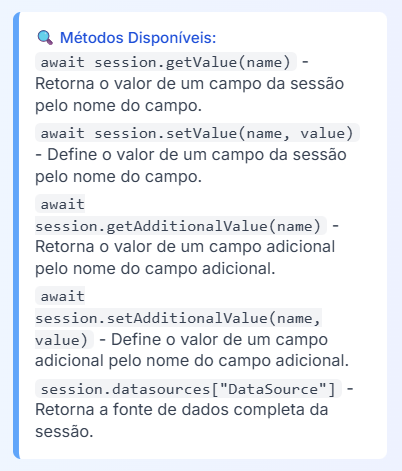
await session.getValue("campo");
await session.setValue("campo", valor);
await session.getAdditionalValue("campo");
await session.setAdditionalValue("campo", valor);
await session.datasources["NomeDoDatasource"];
Use clear variable names
Validate absolutely all data
Avoid overwriting existing information
Return useful data for debugging
Comment important parts
Always think in terms of production environment
Prioritize readability and maintainability
// ##CONFIG##

const DATASOURCE = "Api-request-1";

let data = null;

try {
  data = await session.datasources[DATASOURCE];

  if (!data) {
    throw new Error(`Datasource "${DATASOURCE}" não encontrado`);
  }

  if (!data?.campoObrigatorio) {
    throw new Error(
      "Campo obrigatório não encontrado no payload"
    );
  }

  const valor = data.campoObrigatorio;

  const existente = await session.getValue("campoCRM");

  if (!existente) {
    await session.setValue("campoCRM", valor);
  }

  return {
    sucesso: true,
    erro: false,
    dados: {
      valor
    }
  };

} catch (error) {
  return {
    sucesso: false,
    erro: true,
    mensagem: error.message,
    debug: data
  };
}
If something doesn’t work properly, ask the user for:
Copy the error (right click → copy) and send it here.
If possible, send a screenshot of the screen.
Send the JSON received by the webhook or datasource.
Data received by the system.
Message that explains why it failed.
Data source used by the JavaScript block.
All generated code must be:
Secure
Validated
Robust
Standardized
Easy to understand
Ready for production
Compatible with the Datacrazy CRM
When finishing any analysis or code generation, reply only:
How can I help?
Access ChatGPT directly at this link →https://chatgpt.com/share/69e58457-b630-83e9-b8ef-8c7dbf0653ab
KB For Claude Code in .PDF → https://drive.google.com/file/d/1zlkvheDSY7npEQk1MNfSpMqfC9tqovqD/view?usp=sharing
The <> JavaScript block is one of the most powerful blocks, if not the most powerful, given its wide and huge usefulness, letting you use programming for validations and configurations of different data outputs.
⚠ This feature assumes prior knowledge of programming.
Support does not cover introductory questions about logic or code.
👉 Technical questions about how the block works can be sent to support as usual.
💡 Recommendation: Learn the basics of JavaScript — this will be a milestone in your use of Datacrazy.
Comments
Parameters
Variables and Constants
Objects and Arrays
GET / POST
Webhook
Lead and Deal data
Data saving
JSON response
Best practices
Comments are ignored by the system.
// Isso é um comentário/*
Everything here will be ignored
Including code
*/this is not a comment // ❌ it will break the codeThey store values that can change:
let fruit = 'apple';let fruits = ["grapeBah", "banana", "apple"];They can’t be changed:
const leadName = "Tiger Allan";❌ Error:
Identifier 'leadName' has already been declaredconst dadosLead = {
leadName: "Tiger Allan",
leadPhone: 5547992185579
};dadosLead.leadNameawait session.setAdditionalValue("apelido", dadosLead.leadName);let frutas = ["uvaBah", "banana", "maçã"];frutas[0] // uvaBah
frutas[1] // banana
frutas[2] // maçãawait session.setAdditionalValue("fruta-preferida", frutas[1]);frutas[1] = "abacaxi";Method
Use
GET | Search data |
POST | Send data |
{
  "dadosLead": {
    "leadName": "Tiger Allan2",
    "leadPhone": "5547992185579Bah",
    "fruta": "uvaBah"
  },
  "dadosEmpresaLead": {
    "nomeEmpresa": "ATECH Company",
    "sloganEmpresa": "ATECH tende bem",
    "urlLogo": "https://i.imgur.com/Pis9lRg.png"
  },
  "assets": {
    "valorEmReais": 997,
    "valorReaisComCentavos": 997.89,
    "falida": null
  }
}const webhook = session.datasources["Api-request-1"];await session.setValue("leadName", webhook.dadosLead.leadname);
await session.setValue("leadPhone", webhook.dadosLead.leadPhone);⚠ Mandatory rule:
Name + Phone
or
Name + Email
await session.setAdditionalValue("apelido", webhook.dadosLead.leadName);const webhook = await session.datasources["Api-request-1"];
await session.setValue("leadName", webhook.dadosLead.leadname);
await session.setValue("leadPhone", webhook.dadosLead.leadPhone);
await session.setAdditionalValue("apelido", webhook.dadosLead.leadName);
return {
nomeLead: await session.getValue("leadName"),
phoneLead: await session.getValue("leadPhone"),
businessId: await session.getValue("businessId")
};datasources → reads webhook data
setValue → identifies the lead
setAdditionalValue → saves data
return → returns JSON
⚠ They depend on conditions in the flow
leadId, businessId, stageId, instanceId, attendantId, productId, conversationId, threadId
leadName, leadFirstName, leadEmail, leadPhone, leadCompany, leadCity, leadState, leadZip, leadAddress, leadComplement, leadBlock, leadSite, leadTaxId, leadSource, leadSourceId, leadSourceUrl, leadCtwaId, leadNotes, birthDate
businessTotal, businessCode, businessExternalId, JSONbusinessProduct
productName, productSku, productPrice
leadAttendant, businessAttendant, ticketAttendant
currentDate, companyName, companyEmail
threadData, chatAttendant, department, threadCode
additionalFields, datasourceJsonPath
instagramCommentId, instagramMediaId, instagramCommentDate, instagramName
facebookCommentId, facebookMediaId, facebookCommentDate, facebookName
lastAiText, aiConsumedTokens
✔ Use correctly:
string → text
number → numbers
boolean → true/false
null → absence
❌ Avoid:
"10" (number as string)
"true"
"" as empty
undefined
NaN / Infinity
✔ Correct:
10.5❌ Wrong:
10,5
"10.5"{ "priceCents": 1050 }{ "amount": 10.5, "currency": "BRL" } Always use await
Validate data before using it
Name variables clearly
Use comments
Never return invalid JSON
