 JavaScript Block (Datacrazy)
 Docs + KB, JavaScript Block knowledge base for your AI Agents to help you.
Access ChatGPT directly at this link →https://chatgpt.com/share/69e58457-b630-83e9-b8ef-8c7dbf0653ab
KB for Claude Code in .PDF→ https://drive.google.com/file/d/1zlkvheDSY7npEQk1MNfSpMqfC9tqovqD/view?usp=sharing
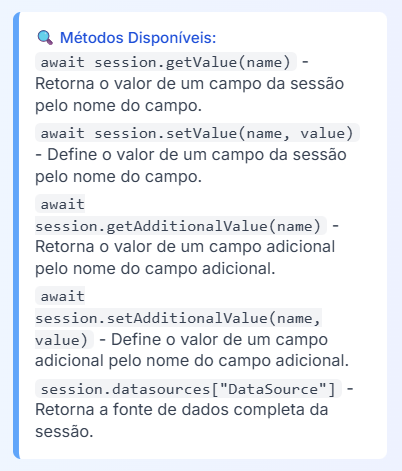
The <> JavaScript block is one of the most powerful, if not the most powerful of the blocks, given its wide and huge usefulness, letting you use programming for validations and setups for different data outputs.
 This feature assumes prior knowledge of programming.
Support does not cover introductory questions about logic or code.
 Technical questions about how the block works can be sent to support as usual.
 Recommendation: Learn the basics of JavaScript — this will be a milestone in your use of Datacrazy.
 What you will learn
Comments
Parameters
Variables and Constants
Objects and Arrays
GET / POST
Webhook
Lead and Deal data
Data saving
JSON return
Best practices
 Comments
Comments are ignored by the system.
 Single line
// Isso é um comentário/*
Tudo aqui será ignorado
Inclusive código
*/isso não é comentário // ❌ vai quebrar o código Variables
They store values that can change:
let fruta = 'maçã';let frutas = ["uvaBah", "banana", "maçã"]; Constants
They can’t be changed:
const nomeLead = "Tiger Allan"; Error:
Identifier 'nomeLead' has already been declared Objects
const dadosLead = {
leadName: "Tiger Allan",
leadPhone: 5547992185579
};dadosLead.leadNameawait session.setAdditionalValue("apelido", dadosLead.leadName);let frutas = ["uvaBah", "banana", "maçã"];frutas[0] // uvaBah
frutas[1] // banana
frutas[2] // maçãawait session.setAdditionalValue("fruta-preferida", frutas[1]);frutas[1] = "abacaxi"; GET vs POST
Method
Use
GET | Search data |
POST | Send data |
 Webhook (data input)
{
"dadosLead": {
"leadName": "Tiger Allan2",
"leadPhone": "5547992185579Bah",
"fruta": "uvaBah"
},
"dadosEmpresaLead": {
"nomeEmpresa": "ATECH Company",
"sloganEmpresa": "ATECH tende bem",
"urlLogo": "https://i.imgur.com/Pis9lRg.png"
},
"assets": {
"valorEmReais": 997,
"valorReaisComCentavos": 997.89,
"falida": null
}
} Capture data
const webhook = session.datasources["Api-request-1"]; Identify Lead
await session.setValue("leadName", webhook.dadosLead.leadname);
await session.setValue("leadPhone", webhook.dadosLead.leadPhone); Mandatory rule:
Name + Phone
or
Name + Email
 Save data
await session.setAdditionalValue("apelido", webhook.dadosLead.leadName); Complete code
const webhook = await session.datasources["Api-request-1"];
await session.setValue("leadName", webhook.dadosLead.leadname);
await session.setValue("leadPhone", webhook.dadosLead.leadPhone);
await session.setAdditionalValue("apelido", webhook.dadosLead.leadName);
return {
nomeLead: await session.getValue("leadName"),
phoneLead: await session.getValue("leadPhone"),
businessId: await session.getValue("businessId")
}; Quick explanation
datasources → reads data from the webhook
setValue → identifies the lead
setAdditionalValue → saves data
return → returns JSON
 Available parameters
 They depend on conditions in the flow
leadId, businessId, stageId, instanceId, attendantId, productId, conversationId, threadId
leadName, leadFirstName, leadEmail, leadPhone, leadCompany, leadCity, leadState, leadZip, leadAddress, leadComplement, leadBlock, leadSite, leadTaxId, leadSource, leadSourceId, leadSourceUrl, leadCtwaId, leadNotes, birthDate
businessTotal, businessCode, businessExternalId, JSONbusinessProduct
productName, productSku, productPrice
leadAttendant, businessAttendant, ticketAttendant
currentDate, companyName, companyEmail
threadData, chatAttendant, department, threadCode
additionalFields, datasourceJsonPath
instagramCommentId, instagramMediaId, instagramCommentDate, instagramName
facebookCommentId, facebookMediaId, facebookCommentDate, facebookName
lastAiText, aiConsumedTokens
 JSON Rules
 Use correctly:
string → text
number → numbers
boolean → true/false
null → absence
Avoid:
"10" (number as string)
"true"
"" as empty
undefined
NaN / Infinity
 Decimals
 Correct:
10.5 Wrong:
10,5
"10.5" Monetary values Recommended
{ "priceCents": 1050 }{ "amount": 10.5, "currency": "BRL" } Always use await
Validate data before using
Name variables clearly
Use comments
Never return invalid JSON
