
Step 1: Accessing the leads list filters
Access the leads list in Datacrazy.
At the top of the screen, there are several filters available that can be used to locate specific leads.
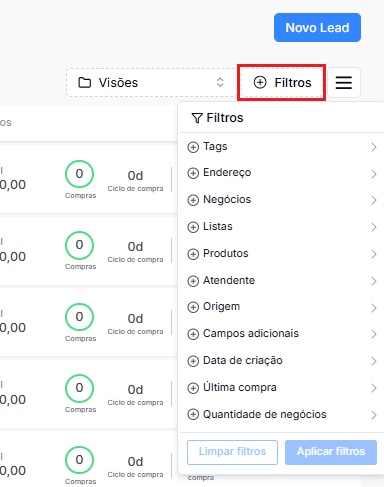
Among the available filters are:
Tags.
Address.
Businesses.
Lists.
Products.
Attendant.
Origin.
Additional fields.
Creation date.
Last purchase.
Number of businesses.
These filters can be used individually or combined, as needed.
Step 2: Applying the desired filters
Select the filters you want to use to find the leads.
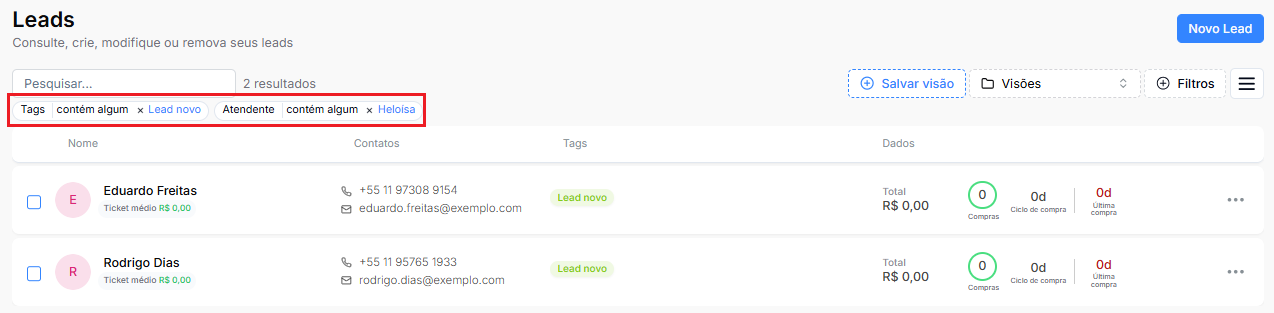
For example, it's possible to filter:
Leads with the New tag.
Leads assigned to a specific attendant.
When you apply the filters, the list will be updated automatically, displaying only the leads that meet the selected criteria.
Step 3: Saving a new view
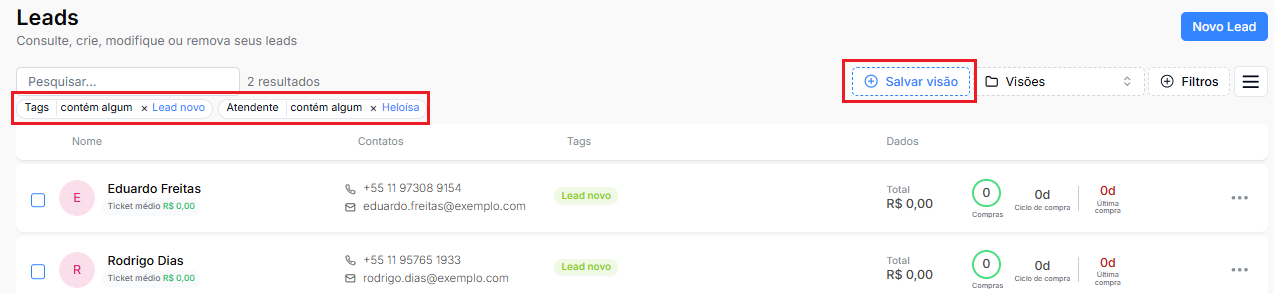
After applying the filters, Datacrazy will display the option to save this combination as a new view.
Just save the configuration so it's available for future queries. A view corresponds to the set of selected filters, allowing you to reuse this configuration without having to apply each filter again.
Step 4: Using a saved view
Whenever you need to query the same data, access the Views menu and select the desired view.
When you select it, all saved filters will be applied automatically, displaying only the leads that match the defined criteria.

You can create as many views as needed to facilitate monitoring of your operation.
Each view can contain one or multiple filters, allowing you to organize different query scenarios according to your team's routine.
Using views makes navigation faster and eliminates the need to set up the same filters repeatedly.